| GINO Graphics Suite - GINOGRAF v9.5 |  |
 |
| GINO Graphics Suite - GINOGRAF v9.5 | |
|
The two routines available for optionally drawing the axes are:
| ggDrawAxes() | for drawing the axes with or without numeric annotation and tick marks |
| ggAddGrid() | for drawing a complete four sided axis frame |
Once an axis position and scaling type have been defined the axes may be drawn with the routine ggDrawAxes():
ggDrawAxes(tick,tickside,val,xory)where xory determines which axis is required (xory = GXAXIS for X axis and xory = GYAXIS for Y axis).
tick, tickside and val determine whether the major and/or minor tick marks are to be drawn and whether values are drawn and on which side of the axis they are to appear. If the tick marks and values are required on the same side of the axis then tickside and val must be equal.
By default, the numeric annotation on a linearly scaled axis (scale3) is written in the form:
Nwhere S is the true value of an axis tick mark, P is the actual number written by the axis tick mark with up to two decimal places and *10 to the power N is a multiplier written at the end of the axis, ensuring N is not in the range -2 to 2.
The numeric annotation on a logarithmically scaled axis is, by default, a set of consecutive integers n representing the power factor, however setting npower in a call to ggSetAxesAnnotation() , can change the annotation to a set of 10n labels or real values; 1,10,100 etc. Intermediate tick marks may be drawn, depending on the available space. The scale factor Log10 is written at the end of the axis if power factor integers are output.An example of linear and logarithmic scaling is shown below.
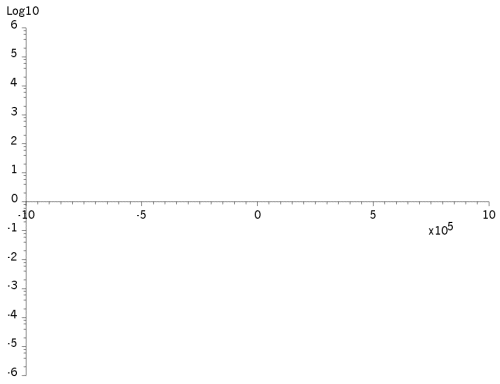 |
Linear and logarithmic axes |
A logarithmically scaled axis can have intermediate tickmarks if there is room and if real values are chosen by setting npower in ggSetAxesAnnotation(), the intermediate tickmarks can also be labelled. If reduc is set in ggSetAxesAttribs(), then the character size may be reduced so that all the labels can be displayed.
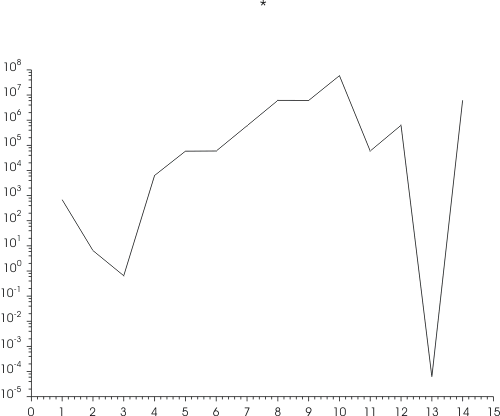 |
Log axis with intermediate tickmark annotation |
Further control over axis annotation position and format is provided by the annotation control routines ggSetAxesAnnotation() and ggSetAxesAttribs().
A complete four sided frame may be drawn using the routine ggAddGrid():
ggAddGrid(style1,style2,anx,any)where style1 and style2 determines the grid style as shown below. anx and any determine whether numeric annotation and/or grid lines or cross lines are drawn for either the X or Y axes. If drawn, tick marks are drawn on the inside of the frame and annotation is drawn on the outside of the frame. Grid positioning and scaling is controlled by the current settings of ggSetAxesPos() and ggSetAxesScaling().
Six of the possible values for style1 and style2 produce the following frame types:
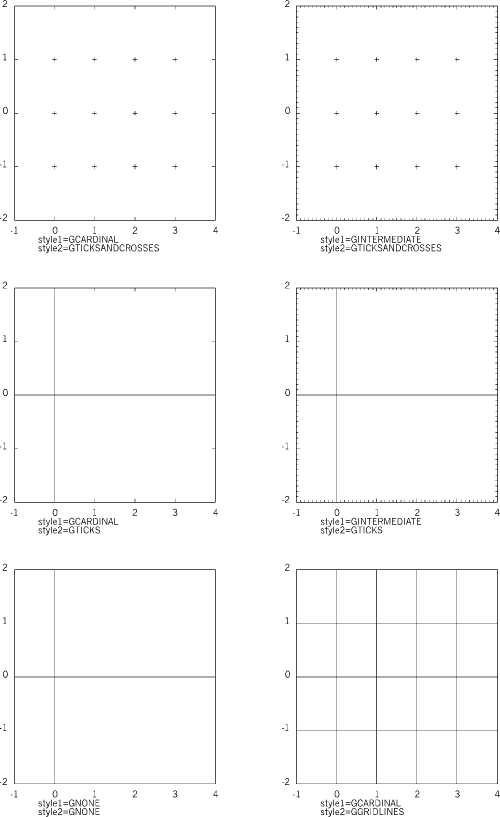 |
Various axes frame types |
As with ggDrawAxes(), further control over axis annotation position and format is provided by the annotation control routines ggSetAxesAnnotation() and ggSetAxesAttribs().
The default symbol drawn at the grid intersection points for styles using GTICKSANDCROSSES is a cross as shown above. This symbol may be changed to be any of the GINO symbols using the routine ggSetGridMarker():
ggSetGridMarker(sym)where sym defines the symbol required. Any of GINO's standard, software or hardware symbols may be used as a grid intersection symbol, further details of which are found in the GINO documentation for gDrawMarker().
The current grid intersection symbol can be enquired using the routine:
ggEnqGridMarker(sym)The format of axes annotation can be altered with the routine ggSetAxesAnnotation():
ggSetAxesAnnotation(ndp,npower,asty, xory)The first two arguments, ndp and npower, control the format of the numeric output, whereas asty sets the type of axis scale factor (in connection with npower). xory is a flag that determines whether the format parameters refer to the X or Y axis. If xory = GXAXIS, the format of the X axis is defined; if xory = GYAXIS, the format of the Y axis is defined.
For log axes, ndp and asty are not used and the default annotation form is where the value at a major tick mark is 10 to the power n, where 'n' is displayed. npower can be used to define an output format at each major tick mark of either the actual values or values in the form 10 to the power n. Thus values less than 10 to the power npower are displayed as a real value and values greater than or equal to 10 to the power npower are displayed in exponential form. A special case of npower=-1 results in all power values including 100.
|
Log axis with 10**n values |
The above diagram shows an example of ggSetAxesAnnotation(0,-1,0,GYAXIS) which results in all Y axis values being displayed as 10npower values.
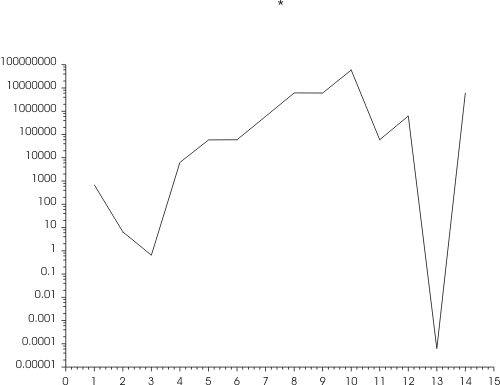 |
Log axis with real values |
The above diagram shows an example of ggSetAxesAnnotation(0,9,0,GYAXIS) which results in all Y axis values being displayed as real values.
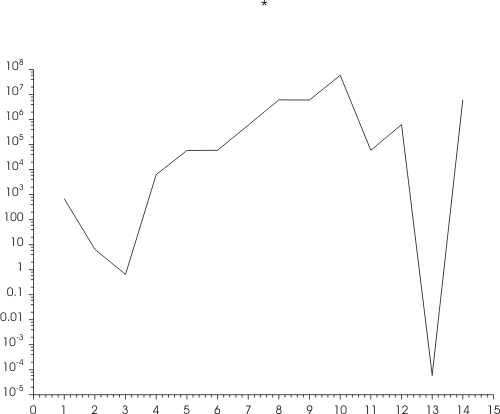 |
Log axis with real and 10**n values |
The above diagram shows an example of ggSetAxesAnnotation(0,3,0,GYAXIS) which results in all Y axis values from npower of 3 and npower of -3 being displayed as 10npower and all others being displayed as real values.
For non-log axes, the number of decimal places displayed for each value is determined using the parameter ndp. Positive values for ndp define the maximum number of decimal places that will be output if required, whereas negative values force that number of decimal places whether needed or not. Values may also be output scaled by a power of ten determined by the value of npower within the range -15 to 15; if npower is outside this range then GINOGRAF calculates a suitable value.
asty sets the type of display for the axis scale factor when drawing axes, offering a number of engineering and scientific forms for example:
| asty | for 10 to the power 3 | for 10 to the power -3 |
| GNOSCALE | - | - |
GSCALEPOWEROF10 |
3 10 |
-3 10 |
| GSCALEZEROS | '000 | 0.00' |
| GSCALEWORD | Thousand | Thousandths |
| GSCALEPREFIX | kilo- | milli- |
N.B. for asty=GNOSCALE, no scale factor is displayed even though the values displayed are divided by 10 to the power npower. For types GSCALEWORD or GSCALEPREFIX, the scale factor npower is required to be a multiple of 3.
An example of the five types is shown below where ndp=-5 and npower=9.
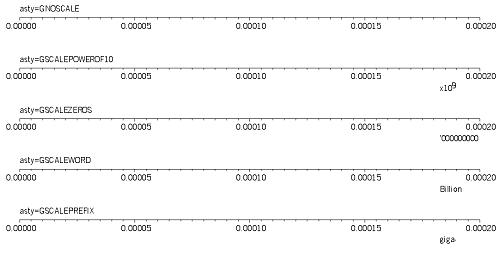 |
The five axes scaling types |
ggSetAxesAnnotation() is also used to control the numeric format of other values output by GINOGRAF. These include the output of Graph and Chart data values from the ggAddxxxValues() routines and values output by the Text Chart routines. In most cases the values will be associated with a particular axes and so they will match those output on the axes itself, but in other cases (Pie Charts and Text Charts) the format of the Y axis is used. Users should also note that all the data values output will be scaled by 10 to the power npower and therefore npower should only be set to non-zero values where axes are displayed (and hence the relevant scale factor) or where the user displays the scale factor manually.
Where a power factor is used on an axis and non scaled data values are required for the Graph or Chart annotation, ggSetAxesAnnotation() must be called with npower set to zero before the data values are output, eg,
[C/C++]
/* SET REQUIRED FORMAT FOR AXIS */
   ggSetAxesAnnotation(-2,3,GSCALEZEROS,GXAXIS);
   ggDrawAxes(GCARDINAL,GCLOCKWISE,GCLOCKWISE,GXAXIS);
/* SWITCH OFF SCALE FACTOR */
   ggSetAxesAnnotation(-2,0,GNOSCALE,GXAXIS);
   ggAddxxxValues(   );
[F90]
! SET REQUIRED FORMAT FOR AXIS
  call ggSetAxesAnnotation(-2,3,GSCALEZEROS,GXAXIS)
  call ggDrawAxes(GCARDINAL,GCLOCKWISE,GCLOCKWISE,GXAXIS)
! SWITCH OFF SCALE FACTOR
  call ggSetAxesAnnotation(-2,0,GNOSCALE,GXAXIS)
  call ggAddxxxValues(   )
The current attributes for numeric and axis format control for each axis are returned through ggEnqAxesAnnotation():
ggEnqAxesAnnotation(ndp,npower,nrfigs,asty,xory)where xory is supplied to specify the required axis. The remaining arguments are as set by the routine ggSetAxesAnnotation() except nrfigs which is an additional argument giving the total field width of the annotation on the specified axis.